Are online pdf converters safe? Discover the security vulnerabilities of cloud-based document processors, data leak pdf compression issues, and why MojoDocs is the ultimate private alternative to ilovepdf.
Every day, millions of internet users drag and drop sensitive documents into free online PDF tools. Whether it is merging a rental agreement, shrinking a medical report to fit email limits, or converting a scanned identity card, the browser has become the default office tool. But have you ever paused to ask: are online pdf converters safe?
Behind the clean interfaces of popular document converters lies a complex web of data tracking, advertising networks, and cloud infrastructure costs. To keep these web tools free, many operators resort to monetization strategies that compromise your digital privacy. This in-depth analysis exposes the hidden plumbing of cloud converters, the real mechanics of server-side data harvesting, and the rise of local-first WebAssembly alternatives designed to protect your data sovereignty.
The Structural Vulnerability of Cloud Processing
To understand the risk of a data leak pdf compression event, we must look at how traditional web applications operate. When you use a standard online PDF utility, you are not processing the file on your device. Instead, you are executing a client-server transaction that transfers ownership of your data to a remote host.
The lifecycle of a document uploaded to a typical cloud converter involves several transition points, each presenting a potential security risk:
- Transit: Your browser sends the document to the host server. Although HTTPS encrypts the payload in transit, protecting it from network eavesdroppers, the encryption terminates at the provider's server gateway. From that point forward, the file is unencrypted in the host's internal memory.
- Ingress Queues: Because PDF parsing, OCR (Optical Character Recognition), and high-ratio compression are CPU-intensive operations, web servers cannot process them inside the standard HTTP request-response cycle. Doing so would crash the server under heavy traffic. Instead, the file is written to an intermediate storage bucket (such as Amazon S3, Azure Blob, or Google Cloud Storage) and a processing job is sent to a message queue like RabbitMQ or Celery.
- Worker Nodes: A separate background worker retrieves the file from storage, writes it to a temporary local disk, processes it using libraries like Ghostscript or PDFtk, generates the output file, and uploads it back to the cloud storage bucket.
- Egress and Caching: The client receives a download link. To ensure a smooth user experience in case of download failures, the server retains the input and output files for a set retention window, which is often 1 hour, 24 hours, or even several days.
This design creates multiple points of vulnerability. First, if a background worker crashes mid-process, the temporary files on the worker disk may not be cleaned up by the server's garbage collection routine. Second, system application logs (which developers monitor using third-party services) often capture filenames, metadata, and structural headers, which can leak personal details. Third, database or bucket misconfigurations can expose directories containing millions of processed customer files to the public internet.
Technical Deep Dive: The Document Object Model of PDFs (And What Can Leak)
To fully grasp why uploading these files is dangerous, it is helpful to look at the internal structure of a PDF document. Unlike simple text files, a PDF is structured on the Carousel Object System (COS) format. It functions as a nested database containing objects, dictionaries, streams, arrays, and cross-reference tables.
A standard PDF contains several hidden sections that carry sensitive information:
- Metadata Dictionaries (Info and Catalog): This section often stores details about the document creator, the author's computer operating system, directory paths, and software licenses. It may also contain corporate usernames and timestamps that show when and where the document was edited.
- Unused Objects and Incremental Updates: When a PDF is modified or signed, the changes are often appended to the end of the file. The original content remains hidden inside the file structure. A cloud converter that parses these files can easily read this hidden data, revealing old versions of contract numbers, price figures, or passwords.
- Embedded Scripting and Interactive Actions: The PDF specification allows interactive elements, including JavaScript (via the OpenAction and Action keys). If a malicious file is uploaded, these scripts can execute on the server. Conversely, a compromised cloud server can inject tracking beacons into your processed PDF, notifying a remote server whenever the document is opened.
When you compress files locally, a client-side engine strips these unnecessary elements, cleans the document tree, and ensures no tracking beacons are embedded. This cleaning process happens within the browser sandbox, protecting your system from external threats.
The Indian Context: Aadhaar, PAN, and Government Uploads
In India, the rapid expansion of digital public infrastructure has made document management a daily task for citizens. Digital portals like Parivahan (for driving licenses and vehicle registration certificates), UIDAI (for Aadhaar updates), NSDL (for permanent account number applications), and the Ministry of External Affairs (MEA) portal for passports have eliminated long lines. However, they have also created a new technical challenge: strict file size limits.
Most government portals enforce limits of 200KB or 500KB to manage server storage costs. A high-resolution scan of a PAN card or Aadhaar card from a mobile scanner app is often 3MB to 8MB. To upload these files, citizens must compress them.
This is where document security breaks down. A typical citizen, seeking a quick solution, searches for "free PDF compressor" and uploads their scanned Aadhaar card or PAN card to the first ranking website. They do not realize that these documents contain highly sensitive personal data. An Aadhaar card includes your legal name, home address, date of birth, biometric indicators, and a unique 12-digit identification number. A PAN card displays your tax ID, signature, and father's name. A passport contains international biometric data.
When these documents are sent to foreign servers, automated data parsers can easily scan them. Advanced text extraction models can read the fields, associate them with the user's IP address, device location, and browser cookies, and compile a detailed profile. This information is highly valuable to financial networks, loan brokers, and marketing companies.
This vulnerability is not limited to home users. In small towns and urban neighborhoods across India, local Xerox shops and Cyber Cafes handle documentation for hundreds of clients daily. To save time, these operators use search-engine-optimized cloud tools to compress client documents. Scanned property records, salary slips, and medical histories are uploaded to unverified servers. While customers receive their physical prints, their digital identities remain cached in cloud databases across the globe.
We routinely order physical items like folders, binders, and paper clips from instant delivery services like Zepto or Swiggy Instamart, and print documents at Blinkit print stores. Yet, we rarely give the same level of care to the digital security of the files we send over the internet. Physical security is visible, but digital leakage is silent, invisible, and irreversible.
The Economics of "Free" Web Utilities
Running a high-traffic web platform is expensive. A service that processes hundreds of thousands of PDFs daily requires significant server bandwidth, CPU cycles, and storage space. If a website does not charge a subscription fee, it must cover these costs through other means. The main monetization strategies used by free cloud utilities include:
- Data Profiling and Aggregation: While reputable services may state in their privacy policies that they do not sell your actual files, they often reserve the right to gather "anonymous metadata." This metadata can include names, corporate domains, location details, and document structures. When combined with tracking cookies, it creates a detailed profile of your online behavior.
- Ad Networks and Tracking Scripts: Free sites are often filled with third-party tracking pixels and advertising scripts. These scripts record your browser fingerprint, track your screen interactions, and link your document activities with your advertising ID.
- Freemium Funneling: Many converters act as lead-generation tools for expensive paid subscriptions, prompting users to upgrade once they reach a file size or conversion limit.
For individuals, small businesses, and freelancers in India, the cost of premium licenses is a significant expense. The table below compares the costs and privacy characteristics of different document processing options:
| Method | Cost | Privacy |
|---|---|---|
| Adobe Acrobat Pro Premium | ~₹1,596 / month (~₹19,152 / year) | High (Desktop execution, but requires cloud login) |
| Traditional Online Converters (Premium Plans) | ~₹540 - ₹1,000 / month (~₹6,480 - ₹12,000 / year) | Medium (Protected under paid terms, still cloud-processed) |
| Free Ad-Supported Cloud Tools | ₹0 (Ad-supported) | Low (Server uploads, trackers, potential scraping) |
| MojoDocs Local-First Web Tools | ₹0 (100% Free) | Absolute (In-browser, client-side, zero network usage) |
By running processing tasks inside your browser, MojoDocs eliminates the need for expensive cloud hosting, database management, and processing queues. We do not incur server processing costs for your files, which allows us to keep MojoDocs free and private, without relying on data monetization. It is a secure, private alternative to ilovepdf and other cloud utilities.
Don't Trust, Verify: The Flight Mode Audit
In cybersecurity, the golden rule is simple: never trust, always verify. If a website claims to process your files locally and protect your privacy, you should not take their word for it. You can easily test their claims using a simple audit: the Flight Mode Test.
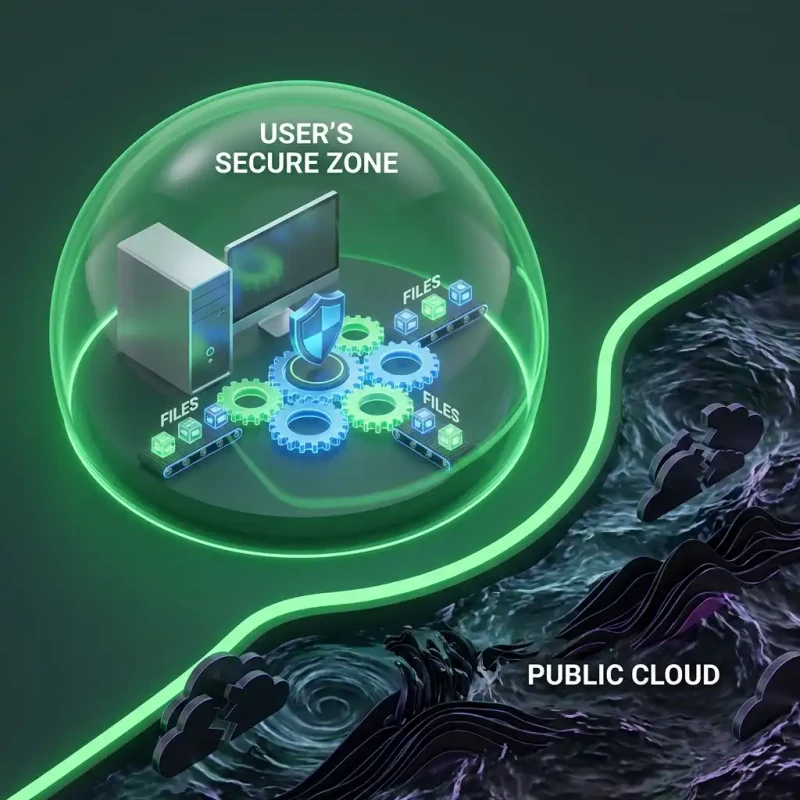
Because MojoDocs is designed on a local-first model, the application code is fully downloaded to your device when the page loads. Once loaded, the tools can perform their tasks without any active internet connection. You can disconnect your device from the network, process your document, and save the result, proving that no data is leaving your system.
The Flight Mode Verification
1. Open MojoDocs. 2. Turn off WiFi/Internet. 3. Process the file. 4. It completes instantly without any data leaving your device.
Pro Tip: Bookmark MojoDocs on your laptop or mobile device. This allows you to compress, merge, and edit documents even when you are traveling, on a flight, or in areas with poor network coverage in rural India. You do not need to wait for a network connection to process your files.
How to Audit Any Document Utility Using Chrome Developer Tools
If you want to perform a detailed verification of how a website handles your data, you can inspect its network traffic. Follow these steps to verify that no files are leaving your computer:
- Open Developer Tools: Right-click anywhere on the webpage and select Inspect, or use the keyboard shortcut
F12(orOption + Command + Ion macOS). - Navigate to the Network Tab: In the developer panel, click on the Network tab. This panel records all data sent or received by the website.
- Filter by Fetch/XHR: Click the Fetch/XHR sub-filter to focus on data exchanges, ignoring local assets like images and fonts.
- Clear the History: Click the clear icon (a diagonal slash symbol) to clear existing network logs, starting with a clean interface.
- Process Your Document: Drag and drop your file into the tool and run the operation. Monitor the network log. If the tool is server-based, you will see a large POST request with a name like
/uploador/process, showing a payload size that matches your file size. If the tool is local-first, the log will remain completely empty during processing.
Using this check, you can verify that MojoDocs processes files locally in your system's memory. It does not send your data to external servers, protecting your files from leakage.
The Engineering Behind Local-First PDF Modification
Many users wonder how complex operations like image downsampling, font subsetting, and document merging can run efficiently inside a web browser. Historically, browsers were restricted to interpreted JavaScript, which is single-threaded and struggles with heavy binary tasks.
MojoDocs overcomes this limitation by using WebAssembly (WASM). WebAssembly is a binary instruction format that runs at near-native speed. It allows developers to compile high-performance code written in languages like C++, Rust, or Go into a format that can run directly inside the browser's sandbox.
When you use the MojoDocs PDF Compressor, the local processing engine follows these steps:
1. In-Memory Reading
When you select a document, the browser reads the file as an ArrayBuffer using the HTML5 FileReader API. This step loads the document bytes directly into your computer's RAM, keeping them isolated within the browser tab's memory.
2. AST Generation and Parsing
The WASM-compiled parser inspects the PDF structure, constructing an Abstract Syntax Tree (AST) in memory. It maps out the document's cross-reference table, catalog dictionaries, and page streams without writing any data to a disk.
3. Optimization Algorithms
The engine applies several optimizations to reduce the document's size:
- Font Subsetting: PDF files often embed entire font packages (such as Arial, Times New Roman, or custom Unicode fonts) even if only a few characters are used. The engine scans the document text, discards unused characters, and rebuilds the font tables, which can reduce file sizes significantly.
- Image Downsampling: High-resolution document scans contain excess pixel data. The engine renders these images onto an in-memory HTML5 Canvas, downsamples them to a screen-optimized 150 DPI, and applies JPEG or WebP compression.
- Metadata Stripping: Scanned files contain historical metadata, editing records, and camera specifications. The engine removes these unnecessary blocks, which helps reduce the file size and removes personal identifiers.
- Flate Compression: The engine applies zlib compression to raw text streams and drawing instructions, maximizing the bytes saved.
4. Blob URL Generation
Once the optimization is complete, the engine writes the new binary stream into a browser Blob object and creates an Object URL (e.g., blob:https://mojodocs.in/d8a4f...). This URL points directly to the data in your RAM. When you click "Download," the browser saves the file directly from your RAM to your storage device, without sending any data over the network.
This design keeps your files private. You are protected from cloud service outages, data breaches, and server-side profiling. For more information on the risks of web-based file tools, read our detailed guide on the risk of online file converters.
Common Data-Mining Scenarios in Everyday Workflows
Many users believe that they do not upload anything important enough to interest data brokers. However, data leaks are often cumulative. Here are several common scenarios where using online converters can expose your personal information:
Scenario A: The Job Applicant
A job seeker prepares their CV and portfolio. The portfolio includes detailed records of their past projects, client names, contact details, and employment history. Many job portals enforce strict 2MB limits. The candidate uploads their CV to an online tool to compress it. A parser reads the file, extracts their email address, phone number, work history, and skills, and adds this information to databases used by headhunting firms or unsolicited marketing campaigns.
Scenario B: The Self-Employed Professional
A freelance designer needs to send an invoice to a client. The invoice contains bank account details, routing numbers, billing addresses, and project descriptions. To merge the invoice with a sign-off sheet, they use an online PDF combiner. The server caches the merged file. If the tool provider's storage bucket is misconfigured, these financial details can be exposed to search engine crawlers, making them accessible to anyone on the web.
Scenario C: The Remote Student
A student preparing for university admissions needs to submit scanned certificates, family income certificates, and passport photos. To meet the submission requirements, they compress these files using a free online utility. The student's name, parent's income, and residential details are processed on remote servers. This information can be correlated with their online tracking profile, leading to targeted ads for education loans and student credit cards.
Scenario D: The Corporate Accountant
A corporate financial controller compiles the quarterly balance sheet, internal payroll sheets, and tax reports. Because the combined PDF document is 40MB, it exceeds the company's secure email gateway limits. The controller uploads the document to an online utility to reduce its size. This action sends proprietary company data, including employee tax records and bank accounts, to an external server, violating corporate security policies and data governance protocols.
Scenario E: The Legal Assistant
An assistant at a legal firm compiles witness statements, case files, and court transcripts. The merged document needs to be compressed to fit the court's online filing portal. They upload the folder of PDFs to a popular cloud editor. During this process, confidential client testimonies and trade secrets are uploaded to public cloud infrastructure, creating potential liabilities under legal confidentiality rules.
Regulatory Compliance, Data Sovereignty, and the Law
The legal landscape surrounding digital privacy is shifting toward user protection. Frameworks such as the General Data Protection Regulation (GDPR) in Europe and the Digital Personal Data Protection (DPDP) Act in India place strict rules on how organizations handle user data.
Under these regulations, a document containing a name, address, tax ID, or photograph constitutes Personal Data. Organizations that process personal data must implement strict controls:
- Purpose Limitation: Data must only be collected and processed for the specific purpose the user requested. Sharing or parsing documents for advertising is a direct violation of these rules.
- Storage Limitation: Personal files must not be stored longer than necessary. Web tools that retain document caches on their disks for days without clear reasons run counter to this principle.
- Data Residency: The DPDP Act and GDPR place restrictions on transferring data across borders. Uploading documents to cloud servers located outside their home country can violate these compliance standards for corporate users.
For businesses, compliance is a core requirement. Using local-first tools like MojoDocs helps companies avoid these compliance risks. Because processing takes place entirely on the user's local device, there is no cross-border data transfer, storage risk, or third-party data processing. Your organization remains in full control of its documents.
Evaluating the Privacy and Security Policies of Web Tools
If you must use a cloud-based service, it is important to review their documentation to assess their privacy practices. Here are three key aspects to check in any provider's terms of service:
1. Data Ownership Clauses
Verify if the terms state that you retain full intellectual property rights to your files. Some free services contain broad licensing clauses that grant them the right to use, host, store, and modify your content to improve their services.
2. Automatic Data Retention Windows
Check how long your documents remain on the provider's servers. Look for services that delete files immediately after processing, or within a maximum of 1 to 2 hours. Be cautious of tools that retain files for longer periods or do not specify their cleanup schedule.
3. Integration of Third-Party Trackers
Review the list of cookies and tracking partners in the site's cookie disclosure page. A secure utility should have minimal third-party scripts. If a tool contains dozens of marketing trackers, your document metadata is likely being utilized for ad targeting.
A Checklist for Secure Document Management
To keep your personal and professional documents secure, consider adopting this workflow for your files:
- Use Local-First Tools: Perform tasks like compression, merging, and splitting locally within your browser using utilities like MojoDocs.
- Strip Metadata: Before sharing documents publicly, remove embedded metadata, author details, and revision history.
- Protect with Passwords: For highly sensitive files, apply strong user passwords and encryption using offline tools.
- Avoid Public Networks: Do not upload or process sensitive documents when connected to public Wi-Fi networks in cafes or airports, as this introduces traffic interception risks.
- Clean Up Local Directories: Periodically clear your browser cache and temporary download directories to remove old document versions.
Conclusion
Privacy is a fundamental right, not an optional feature. Every document you upload to the cloud leaves a digital trace that can be tracked, cataloged, or exposed in a data breach. For sensitive files like Aadhaar cards, financial statements, and business contracts, local-first processing is the safest approach.
MojoDocs provides a private, client-side solution for your document tasks. By executing all code locally in your browser's WebAssembly sandbox, MojoDocs ensures that your files never leave your device. This keeps your personal information secure, without the need for expensive premium subscriptions or cloud uploads.