Stop paying ₹350 at studios. Learn how to format a 4x6 inch sheet with 8 passport photos and print it cheaply via Blinkit, Zepto, or your local Xerox shop.
Here is an open secret of the photography industry: The "Passport Photo" product is mostly a service fee. When you pay ₹350 at a local studio for 8 photos, you aren't paying for the paper and ink. You are paying for the photographer's time, the studio electricity, the Photoshop license, and their profit margin.
But in 2026, you have a 50MP camera in your pocket and MojoDocs AI in your browser. Why pay the service fee?
By preparing your photo yourself using MojoDocs and using the "4x6 Sheet Hack", you can get the exact same professional quality prints for the price of a cup of tea (approx ₹20). This method is used by smart travelers globally.
The Economics: ₹350 vs ₹20
Let's look at the real economics of printing in India:
- Studio Passport Service: ₹250 to ₹500 (Includes taking photo + editing + printing 8 copies).
- Standard 4x6 Glossy Print: ₹10 to ₹25 (Available at Xerox shops, Blinkit, Vistaprint).
The Math:
A standard Indian Passport photo is 35mm x 45mm.
A Standard Postcard Print is 4x6 inches (approx 102mm x 152mm).
If you arrange them in a grid, you can fit exactly 8 copies of a 35x45mm photo on a single 4x6 sheet.
8 photos for ₹20 = ₹2.50 per photo.
The MojoDocs Workflow (3 Steps)
Step 1: Prepare the Single Photo
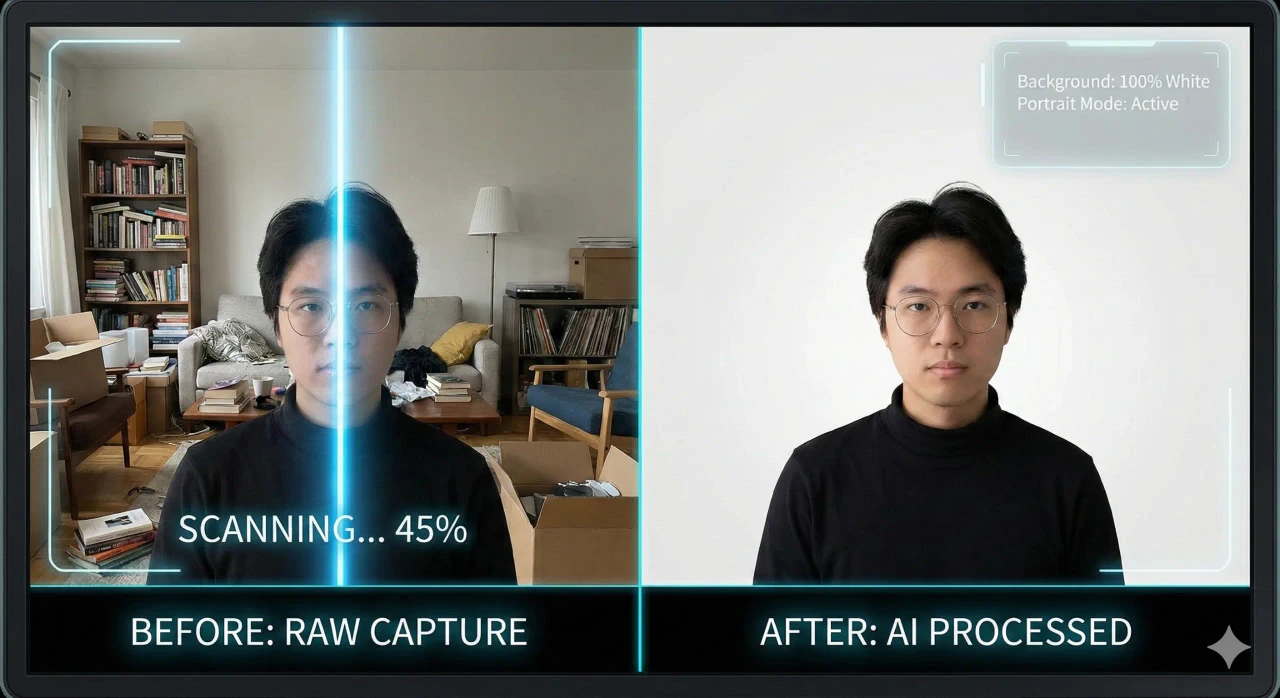
Use the MojoDocs Passport Tool. Upload your selfie. Use the local AI to remove the background (White/Grey). Align your face in the biometric grid.
Step 2: Generate the "Sheet"
This is the crucial step. Don't download the single photo yet.
Look for the Export Mode toggle at the bottom of the editor. Switch it from "Single" to "Sheet (4x6)".
MojoDocs will instantly generate a high-resolution (300 DPI) JPEG image. You will see your face repeated 8 times in a neat grid. We even add thin grey "Cut Lines" (crop marks) to help you cut them out perfectly with scissors later.
Save this image to your phone gallery.
Step 3: Print It (The Indian Way)
Now you have a standard 4x6 image. You have three main options to print it in India:
Option A: The Cloud Delivery (Blinkit / Zepto / Instamart)
In major metros (Delhi NCR, Bangalore, Mumbai), quick-commerce apps now offer a "Print Store". This is the laziest and best way.
- Open Blinkit/Zepto android app.
- Search for "Photo Print" or look under "Office & Stationery".
- Select "4x6 inch Glossy Photo Paper".
- Upload your MojoDocs sheet image.
- Cost: Usually ₹10-₹15 print cost + delivery fee.
- Time: Delivered in 10-15 minutes.
Warning: Ensure you DO NOT select "Crop to fit". Select "Fit to page" or ensure the preview shows all 8 faces intact.
Option B: The Local Xerox Shop
Walk into any shop that says "Xerox & Color Print". Most Xerox shops have a photo printer.
- Ask: "Bhaiya, 4x6 glossy photo paper (postcard size) pe print chahiye."
- WhatsApp/Email them the file.
- Crucial Instruction: Tell them "Do not resize. Print at 100% scale." (Size mat cheddar).
- Cost: ₹20-₹40 depending on the shop location.
Option C: Online Bulk Services (Zoomin / Vistaprint)
If you need photos for the whole family (e.g., Mom, Dad, Kids), sites like Zoomin offer 4x6 prints for as low as ₹5/sheet if you order a bundle of 20.
Paper Choice Matters: Matte vs Glossy
For official documents, the paper type is strict. Do not print on A4 copy paper.
- Glossy: The global standard. Accepted for Indian Passports, PAN cards, and most visas. It has high contrast and sharp colors. Cons: Prone to fingerprints.
- Matte: Semi-gloss or dull finish. Preferred for US Visas sometimes to reduce glare. Less distinct fingerprints.
- Standard Paper (A4 Bond Paper): NEVER use this. It will be rejected. It must be "Photo Quality" paper (>180 gsm).
Detailed Comparison Table
| Method | Total Cost | Photos Qty | Time |
|---|---|---|---|
| Studio | ₹350 | 8 | 1 Hour |
| Metro Booth | ₹200 | 4 | Instant |
| MojoDocs + Blinkit | ₹20 | 8 | 15 Mins |
How to Cut (The Finish)
Once you have your sheet, you need to cut them. Don't ruin it now!
- Use long, sharp scissors. Avoid small nail scissors which leave jagged edges.
- Or use a ruler + precision cutter (box cutter) on a cutting mat for perfect straight lines.
- Follow the faint grey guidelines MojoDocs added.
- Cut inwards from the edge to avoid creasing the paper.
Conclusion
Printing your own passport photos is the ultimate life hack for Indian families. It saves money, it's faster than driving to a studio, and you get to control exactly how you look.
Stop paying the "Lazy Tax" at studios. Use MojoDocs, generate the sheet, and print it like a pro.
.webp)