An in-depth security, speed, and privacy comparison between PDF2Go, Smallpdf, and MojoDocs. We analyze the differences between legacy cloud compression and modern client-side WebAssembly to see which PDF tool keeps your documents safe and saves you money.
The digitalization of the Indian administrative and commercial ecosystem has fundamentally altered how we manage personal records. Whether you are applying for a passport renewal on the Ministry of External Affairs (MEA) portal, updating your residential address with the Unique Identification Authority of India (UIDAI) for Aadhaar, registering a vehicle on the Parivahan portal (DL/RC), or submitting tax declarations through NSDL for your PAN card, one restriction remains constant: file size limits.
Most government portals enforce strict document caps, typically requiring uploaded files to be under 200KB, 300KB, or 500KB. For individuals who scan documents at home, receive high-resolution files from local Xerox shops, or download digital statements, their files are often 5MB, 10MB, or even larger. The immediate reflex is to search the web for a free tool to compress these documents. This search inevitably leads to legacy web platforms such as PDF2Go and Smallpdf.
However, uploading sensitive identity documents containing passwords, permanent account numbers (PAN), biometric identifiers, and full financial statements to public cloud servers introduces serious security risks. In this secure pdf compressor review, we will dissect the architecture of the popular pdf2go compressor, evaluate the security trade-offs of smallpdf vs mojodocs, and analyze how they handle your files. We will evaluate the true security of their architectures, examine the economics of their subscription fees in Indian Rupees (₹), and determine which tool actually protects your files.
The Security Paradox of Cloud PDF Converters
To understand the danger of online tools, we must first understand the lifecycle of a document uploaded to a standard web service. Legacies like PDF2Go and Smallpdf operate on a classic client-server model. When you drag and drop a PDF onto their interface, your browser establishes an encrypted connection (HTTPS) and uploads the complete document payload over the internet to their servers. These servers are typically located in massive data centers operated by third-party cloud providers in the United States or Western Europe.
Once the document arrives on the server, a worker process—usually written in Python, Node.js, or Go, executing command-line PDF processing tools—takes the file, decompresses its internal streams, downsamples its images, strips its metadata, and packages it back into a compressed output. The server then saves this output file on its storage volumes, creates a temporary download URL, and transmits it back to your browser. The platform's privacy policy usually promises to delete your files from their server after a set timeframe, typically one to two hours.
While this process seems straightforward, it presents three severe vulnerabilities:
- The Deletion Policy is Not a Technical Control: A policy is merely a written promise. It is a declaration of intent, not a physical impossibility. If the server hosting the files is compromised, if an administrative console is left exposed, or if a backend developer configures the temporary storage buckets incorrectly, your uploaded documents can become publicly accessible. Data leaks from cloud storage misconfigurations are one of the most common causes of data exposure.
- Shared Memory and Virtualization Risks: Multi-tenant cloud servers process thousands of files simultaneously. In a shared virtualized environment, bugs in operating systems or hypervisors can allow one process to inspect the memory of another. If a high-volume PDF converter is processing your Aadhaar card at the same millisecond it is processing an infected PDF from a malicious actor, memory bleed attacks could expose your personal data.
- Compliance and Jurisdiction: Under India's Digital Personal Data Protection (DPDP) Act of 2023, organizations processing the personal data of Indian citizens must follow strict guidelines regarding consent, storage, and cross-border transfers. Uploading personal documents to foreign servers without a clear, explicitly signed data processing agreement bypasses these legal protections.
For average users, uploading a school assignment might carry low risk. However, uploading identity cards, property registration papers, birth certificates, or corporate bank statements to an external server is a security gamble.
Under the Hood of MojoDocs: Local-First WebAssembly
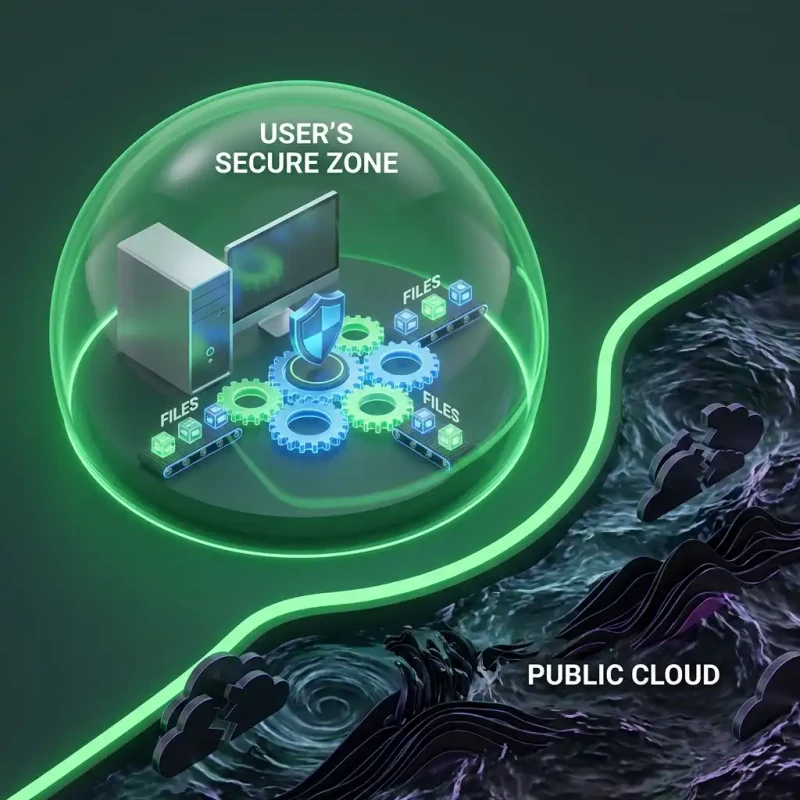
MojoDocs was built to challenge the client-server paradigm by replacing remote servers with local computation. Instead of sending files to the cloud, MojoDocs ships the processing engine directly to your browser.
This local-first architecture is made possible by WebAssembly (WASM). WebAssembly is a binary instruction format that allows code written in low-level languages like C, C++, Rust, and Go to execute inside modern web browsers at near-native speeds. Rather than relying on a remote server to run PDF compression software, MojoDocs compiles native C and Rust PDF engines into WebAssembly modules. When you navigate to the MojoDocs PDF Compressor, your browser downloads these static WASM modules once and caches them locally.
When you drop a file into MojoDocs, the following client-side sequence occurs:
- The web application reads the file as an
ArrayBufferdirectly from your computer's local hard drive into your browser's memory. - The local WebAssembly engine parses the document structure in RAM.
- The engine executes downsampling, stream optimization, and font subsetting algorithms on the data in memory.
- A new compressed PDF file is generated as a local
Bloband is instantly downloaded to your system.
Because your files never travel over the network, your data remains secure on your device. The process is sandboxed within the browser tab, preventing access to the rest of your operating system. This represents a fundamental shift in data security: you do not have to trust a company's privacy policy because they never receive your files in the first place.
The Flight Mode Verification
1. Open MojoDocs. 2. Turn off WiFi/Internet. 3. Process the file. 4. It completes instantly without any data leaving your device.
Direct Product Breakdown: PDF2Go vs. Smallpdf vs. MojoDocs
Let us compare the three platforms across critical vectors including security architecture, feature sets, processing performance, and cost.
1. PDF2Go
PDF2Go is a long-standing online PDF suite developed by Germany-based QaamGo Web GmbH. It provides a variety of document conversion, compression, and editing features.
Architecture and Security: PDF2Go runs on a standard server-side model. Your files are sent to their servers for processing. The company claims to use SSL encryption and automated deletion scripts, but your files still reside on their server disks during the conversion window. Furthermore, the free version of PDF2Go is funded by extensive programmatic advertisements. These ads load third-party tracking scripts that monitor your browser habits, which can compromise overall system security.
Limits and Performance: Free users face significant restrictions. You are limited to file sizes below 100MB, and you must wait in a processing queue during peak traffic hours. If the server queue is congested, compressing a 10MB file can take several minutes. Batch processing is limited on the free tier, and advanced compression settings are locked behind their premium subscription.
Cost: To remove advertisements, bypass queue delays, and lift file size limits, users must purchase a Premium subscription. This costs $6.50 per month, which is approximately ₹540 per month, or roughly ₹6,500 per year for a single user.
2. Smallpdf
Smallpdf is one of the most popular web-based PDF utility platforms, based in Switzerland. It is known for its polished, modern user interface.
Architecture and Security: Like PDF2Go, Smallpdf processes documents on its cloud servers. Although Smallpdf is ISO/IEC 27001 certified and GDPR compliant, the core security model still requires you to trust that their servers are secure, that their staff has restricted access, and that their file deletion processes function correctly. For sensitive Indian identification cards (like PAN or Aadhaar), this model does not eliminate the risk of server-side data leaks.
Limits and Performance: Smallpdf has become increasingly restrictive over the years. Free users are limited to only two tasks per day. If you compress one document and merge another, you are blocked by a paywall for the next 24 hours. The free tier also lacks strong compression settings, leaving files larger than expected unless you upgrade.
Cost: Smallpdf Pro costs $9 to $12 per month, which translates to ₹750 to ₹1,000 per month. On an annual basis, this amounts to ₹9,000 to ₹12,000 per user, making it a costly recurring subscription for small businesses or individuals.
3. MojoDocs
MojoDocs is a modern utility suite designed around data sovereignty and local-first execution. It does not use server-side computation for file processing.
Architecture and Security: 100% client-side. WebAssembly modules execute inside the browser's sandbox. No data is sent to external servers, and the tool functions without internet access once loaded. There are no ads, tracking pixels, or third-party scripts that compromise user privacy.
Limits and Performance: Because MojoDocs uses your device's CPU and RAM to compress files, it bypasses network upload bottlenecks. Compressing a 100MB file takes seconds because there is no upload step. There are no daily task limits, no file size caps, and no premium features locked behind paywalls. The only performance limit is the hardware capability of your own device.
Cost: 100% free. Because MojoDocs does not run expensive server-side compute clusters, its infrastructure costs are minimal. It passes these savings directly to users by offering the entire utility suite at zero cost.
Pro Tip: When uploading identity documents like Aadhaar or PAN to any digital portal, always use a local utility to apply a digital watermark. Using MojoDocs, you can add watermarks to your PDFs locally, ensuring they cannot be misused if the target portal itself suffers a data breach.
Technical Breakdown: Client-Side vs. Server-Side PDF Compression
How does a PDF compressor work, and how does MojoDocs match the quality of expensive cloud services using only your browser? Let us look at the technical mechanics of PDF document structure and optimization.
The Anatomy of a PDF Document
A PDF (Portable Document Format) file is not a single flat image; it is a structured database of object definitions. The file structure consists of four main parts:
- Header: Specifies the PDF version standard (e.g., PDF-1.4 or PDF-1.7).
- Body: Contains the objects that make up the document, such as text strings, page layouts, vector graphics, font descriptions, and embedded raster images.
- Cross-Reference (XRef) Table: An index listing the offset location of each object within the file, allowing viewers to jump to specific pages instantly.
- Trailer: Points to the XRef table and defines critical root objects, such as the document catalog.
When you compress a PDF, the compressor performs several optimization routines on these internal objects:
1. Image Downsampling and Recoding
Images are usually the largest component of a PDF file. Scanned documents often contain raw, uncompressed TIFF or high-quality JPEG images at resolutions of 300 to 600 DPI (dots per inch). For viewing on screens or printing on standard office paper, 150 DPI is more than sufficient. A compressor reduces the file size by resizing these images (downsampling) and re-compressing them using modern lossy compression algorithms (like JPEG) or lossless algorithms (like Flate). In client-side WebAssembly, MojoDocs reads the image streams, decodes them to raw pixels using canvas context elements, resizes them, and re-encodes them back into standard streams, reducing image weight by up to 90% without visible loss in quality.
2. Font Subsetting
When you generate a PDF document using specialized fonts, the creation software often embeds the entire font family (containing hundreds of glyphs, characters, and symbols) inside the file to ensure it displays correctly on other machines. This can add 1MB to 2MB of weight per font. A PDF compressor scans the text objects, determines which characters are actually used in the document, and strips away the unused glyphs. This process, called font subsetting, preserves document formatting while saving space. MojoDocs executes this logic locally, updating the PDF's font descriptor objects in RAM.
3. Object Stream Compression
PDF body objects are represented as plain-text elements (e.g., page coordinates, text placement matrices). PDF readers support compressing these text tables using the Flate (deflate) algorithm. Modern compressors group multiple objects into single compressed object streams, reducing the overhead of individual object declarations. MojoDocs compresses these tables directly in your browser's memory using a compiled WASM port of zlib.
4. Metadata and Garbage Collection
PDF editors often append edit history, thumbnail images, XML metadata, and orphaned object definitions to the end of the file instead of rewriting it from scratch. This makes the file larger over time. MojoDocs performs garbage collection on the PDF structure, rebuilding the XRef table from scratch and purging all unused, corrupted, or historical revision data from the file body.
The Cloud Latency Penalty
With cloud-based compressors, even if the processing takes only 2 seconds on the server, you must wait for the file to upload and download. If you are using a mobile network connection in India (e.g., on a train or in a rural district with weak coverage), uploading a 20MB file can take several minutes. If the connection drops midway, you must restart the upload. In contrast, because MojoDocs operates locally on your machine, it processes the file in memory. A 20MB file can be compressed in under 2 seconds, regardless of your internet connection speed. By keeping the processing local, you eliminate both the security risks and the time delays of cloud uploads.
The Economic Narrative: Real Savings in Indian Rupees (₹)
Software subscriptions (SaaS) can quickly become a significant financial burden. While a single subscription of ₹800 or ₹1,000 per month may seem small, it adds up over time for students, freelancers, small business owners, chartered accountants, and legal professionals. Let us examine the true economic cost of these tools.
A typical chartered accountant (CA) firm in Mumbai or Bangalore handles thousands of client documents, including tax returns, PAN applications, audit reports, and bank statements. To meet the size limits of government portals like the Income Tax e-filing system or NSDL, they must compress hundreds of PDFs daily. If they use Smallpdf, the free tier's limit of two tasks per day forces them to buy a license. If they have a team of five accountants, subscribing to Smallpdf Pro will cost them roughly ₹45,000 to ₹60,000 annually. Subscribing to Adobe Acrobat Pro for the same team will cost over ₹90,000 per year.
For individuals, the economic barrier is even more pronounced. A student preparing files for a passport application (MEA) or university admissions will often scan documents at a local Cyber Cafe or Xerox shop. The operator scans the sheets, charges ₹10 per page, and hands over a 15MB file. If the student tries to compress it using Smallpdf but has already used their two free tasks, they are blocked. They might pay the shop operator extra to compress the file, or risk security by using sketchy, ad-filled conversion sites. In contrast, they could open MojoDocs on their phone, compress the file for free, and print it at a local store or order delivery via Blinkit, Zepto, or Swiggy Instamart print portals without spending extra money.
| Method | Cost | Privacy |
|---|---|---|
| Adobe Acrobat Pro | ₹18,000 / year (Per User Subscription) | Server-side uploads; subject to cloud terms |
| Smallpdf Pro | ₹9,000 to ₹12,000 / year (Per User) | Server-side; data travels overseas to Europe |
| PDF2Go Premium | ₹6,500 / year (Per User) | Server-side; free tier has programmatic ad-tracking |
| Xerox / Cyber Cafe Scan Service | ₹50 to ₹150 per session (variable rates) | Very Low; operator retains a local copy on public PC |
| MojoDocs Local-First | ₹0 (Free Forever, No Limits) | Absolute; processed in local RAM; zero network leakage |
By moving the computing work to the user's device, MojoDocs eliminates the server hosting costs that force companies like Smallpdf to charge subscription fees. It offers a free, high-performance solution that protects user privacy without recurring bills.
Architectural Deep Dive: How the Browser Sandbox Keeps You Safe
Some users ask: "If MojoDocs runs code inside my browser, is it safe for my computer?" The answer lies in the design of modern web browsers.
Browsers like Chrome, Firefox, Safari, and Edge are built around a strict security model called **sandboxing**. A sandbox is a restricted environment where code can run without accessing the rest of your system. When you open a tab, the browser isolates it inside a sandbox. This tab cannot read your local files, view your other tabs, or modify system files unless you explicitly authorize it.
WebAssembly runs inside this sandbox. When the MojoDocs engine processes a PDF, it can only see the specific file you dragged and dropped into that tab. The engine cannot access your downloads folder, scan your hard drive, or read files in other tabs. This isolation makes browser-based tools safer than installing native desktop programs (.exe or .dmg files), which often require administrator permissions and can access your entire filesystem.
Furthermore, because MojoDocs operates entirely in your browser's RAM, the file is automatically wiped from memory when you close the tab. There is no persistent storage on the website, and no file recovery tools can retrieve your document once the session is closed. This provides a level of security that cloud-based services cannot replicate.
Step-by-Step Security Verification
If you are skeptical about online privacy claims, you can verify MojoDocs' local-first architecture yourself. You do not need to trust our word; you can audit the tool using standard browser developer tools. Here is how to do it:
- Open the website: Open the MojoDocs website and navigate to the PDF Compressor tool.
- Open Developer Tools: Press
F12or right-click anywhere on the page and select Inspect. Switch to the Network tab. - Activate Flight Mode: Disconnect your computer from the internet. Turn off your Wi-Fi or unplug your ethernet cable.
- Compress a Document: Drag and drop a PDF into the compressor box. Click the compress button.
- Check the Output: The file will compress instantly, and the download prompt will appear. You will see that the Network tab shows zero bytes transmitted during the process.
If MojoDocs sent your file to a server, the compression would fail the moment you disconnected from the internet. This offline functionality is proof that your files remain on your device.
Additionally, you can compare this test with PDF2Go or Smallpdf. If you turn off your Wi-Fi and attempt to compress a document on their sites, you will see immediate connection errors, proving that they cannot operate without uploading your files to their servers.
The Wider Benefits of Data Sovereignty
Data sovereignty is not just about keeping personal documents secure; it is about reclaiming control over our digital lives. When you upload a file to a cloud service, you give up control over how that file is stored, who can view it, and how it might be used to train AI models or target advertisements. As data breaches become more frequent, keeping your data local is the only way to guarantee privacy.
By using client-side tools like MojoDocs, you support a decentralized web model where privacy is built into the architecture, not treated as a premium add-on. This model helps users protect their sensitive documents from corporate and government surveillance, ensuring that their personal information remains private.
If you want to compare other popular PDF suites, you can read our comparison of iLovePDF vs Smallpdf vs MojoDocs to see how legacy platforms measure up in the modern web ecosystem.
Conclusion: The Verdict
Choosing the right PDF utility depends on your specific needs. If you require legally binding eSignatures with audit trails, Smallpdf's paid plans may be useful. If you are working on an old machine with limited RAM and need to offload processing to the cloud, PDF2Go's servers can handle the task, provided you are comfortable uploading your documents.
However, if you are processing sensitive personal or business documents—such as Aadhaar cards, PAN cards, passport scans, or financial statements—and want to ensure your files remain secure, MojoDocs is the clear choice. Its local-first, WebAssembly-powered design ensures your data never leaves your device, providing absolute privacy at zero cost.