Selling Kurtis or Sarees on Meesho? Stop uploading photos taken on your bedsheet. Learn how to create boutique-style catalog images using your phone and Local AI to boost orders.
Meesho is the land of opportunity for millions of Indian entrepreneurs. Whether you are a Surat textile manufacturer or a "Work from Home" reseller in Pune, Meesho allows you to reach crores of customers.
But competition is fierce. If you search for "Cotton Kurti" on Meesho, you see 10,000 results. Which one does the customer click?
The Harsh Truth: Customers judge the quality of the cloth by the quality of the photo. If your photo is dark, blurry, or taken on a wrinkled floral bedsheet, the customer subconsciously thinks: "This product is cheap/low quality."
You don't need to hire a model for ₹5,000. You don't need a studio. You can transform your "Bedroom Photos" into "Boutique Photos" using MojoDocs for free.
The "Bedsheet Problem"
Most new resellers start by laying the Saree/Kurti on their double bed or the floor and taking a photo from above.
- Issue 1: Wrinkles. The bedsheet wrinkles distract from the saree pattern.
- Issue 2: Shadows. The ceiling fan casts a spinning shadow on the fabric.
- Issue 3: Perspective. Taking a photo from a weird angle makes the dress look short or wide.
The Solution: The "Virtual Studio" Workflow
We are going to use Local Edge AI to digitally transport your product from your bedroom to a professional studio.
Step 1: The "Hanger" Setup (Better than Bed)
Stop laying clothes flat. Gravity is your friend.
- Buy a simple Wood or Velvet Hanger (₹50). Do not use flimsy wire hangers.
- Hang the Kurti/Saree against a plain wall or a door.
- Why? Gravity pulls the fabric down, removing wrinkles naturally. It shows the "Fall" of the saree.
Step 2: Good Light (The Window Rule)
Turn off your yellow room bulb. Open the window. Hang the clothes facing the window. The sunlight should hit the clothes directly. This brings out the true vibrant colors (Reds/Pinks) of Indian ethnic wear.
Step 3: The MojoDocs Magic
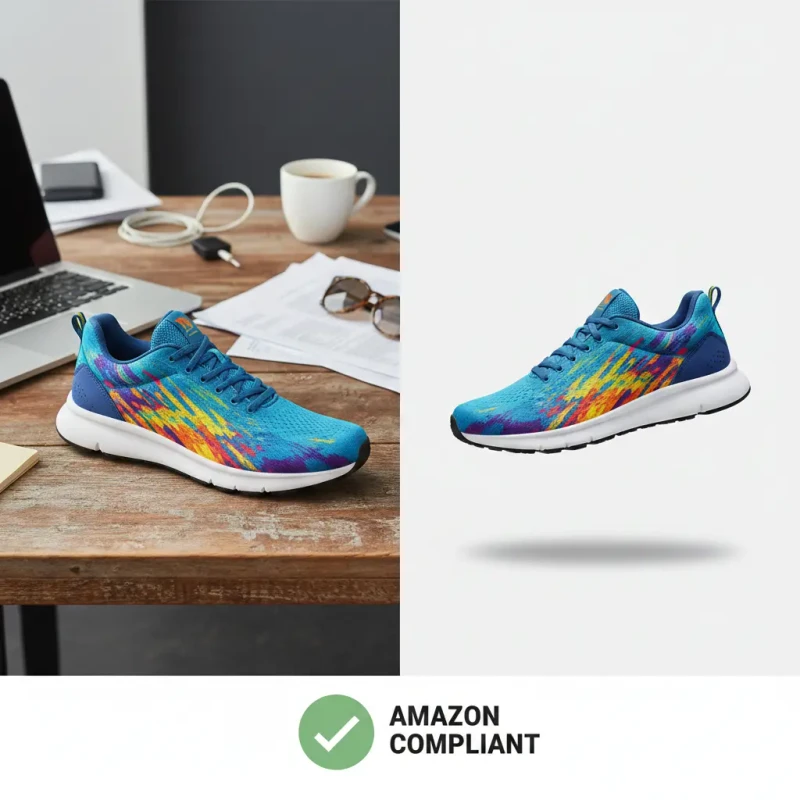
Now, take the photo. You will still see the door or the wall peeling paint behind it. No problem.
- Open MojoDocs Background Remover on your phone browser.
- Upload the photo.
- AI Action: The tool instantly separates the Saree/Kurti from the door.
- Background Choice:
- White (#FFFFFF): Best for Amazon/Flipkart.
- Light Grey (#F5F5F5): Best for Meesho/Instagram. It looks softer and more "Premium Boutique".
- Soft Pink/Beige: Good for bridal wear.
The Economics: Studio vs DIY
Let's calculate the profit impact for a Reseller with 20 new designs per month.
| Method | Cost per Catalog | Time |
|---|---|---|
| Professional Model Shoot | ₹3,000 - ₹5,000 | 1 Week |
| Ghost Mannequin Service | ₹1,500 | 3 Days |
| MojoDocs DIY | ₹0 (Free) | 10 Minutes |
Protecting Your Designs (The Surat Fear)
If you are a manufacturer in Jaipur or Surat creating unique prints, you have one big fear: Copycats.
If you upload your unreleased catalog to a cloud-based editor, there is a risk. Are they selling your design data to competitors? Are they scraping patterns?
The Privacy Guarantee
MojoDocs is safer than your own hard drive. Because we use WebAssembly, the image processing happens inside your phone's memory. We never see your designs. You can edit your entire upcoming Diwali Collection offline, safe from prying eyes.
Bonus Tip: WhatsApp Status Marketing
Most Meesho sales happen on WhatsApp. When you share a catalog on WhatsApp Status:
- Bad: 10 photos of a bedsheet. People skip.
- Good: 1 Main Photo with a Clean Background + Your Logo + Price.
Use MojoDocs to get the clean photo. Then use any text app to add your "Reseller Name". This makes you look like a Direct Manufacturer, allowing you to charge a higher margin.
Conclusion
Your phone is your shop window. Keep it clean. Keep it professional.
Don't let a bad background ruin a beautiful saree. Clean it up with MojoDocs and watch your Meesho orders grow.